
后浪云百度小程序教程:swan.downloadFile

- swan.downloadFile
- 方法参数
- object 参数说明
- success 返回参数说明
- fail 返回参数说明
- 示例
- 图片示例
- 代码示例 1
- 代码示例 2:指定下载路径
- Bug & Tip
- 方法参数
swan.downloadFile
请参考使用注意事项进行开发。
解释:下载文件资源到本地,客户端直接发起一个 HTTP GET 请求,返回文件的本地临时路径。
方法参数
Object object
object 参数说明
| 属性名 | 类型 | 必填 | 默认值 | 说明 |
|---|---|---|---|---|
url | String | 是 | 下载资源的 url | |
header | Object | 否 | HTTP 请求 Header ,Header 中不能设置 Referer | |
filePath | String | 否 | 指定文件下载后存储的路径 | |
success | Function | 否 | 下载成功后以 tempFilePath 的形式传给页面, | |
fail | Function | 否 | 接口调用失败的回调函数 | |
complete | Function | 否 | 接口调用结束的回调函数(调用成功、失败都会执行) |
success 返回参数说明
| 参数 | 类型 | 说明 |
|---|---|---|
tempFilePath | String | 临时文件路径,下载后的文件会存储到一个临时文件 |
statusCode | Number | 开发者服务器返回的 HTTP 状态码 |
fail 返回参数说明
- Android
| 错误码 | 说明 |
|---|---|
202 | 解析失败,请检查参数是否正确 |
1001 | 执行错误 |
- iOS
| 错误码 | 说明 |
|---|---|
202 | 解析失败,请检查参数是否正确 |
1001 | 请求文件超过 50M |
1002 | 无法确定下载文件大小 |
示例
跳转编辑工具
在开发者工具中打开
在 WEB IDE 中打开
扫码体验
代码示例

请使用百度APP扫码
图片示例
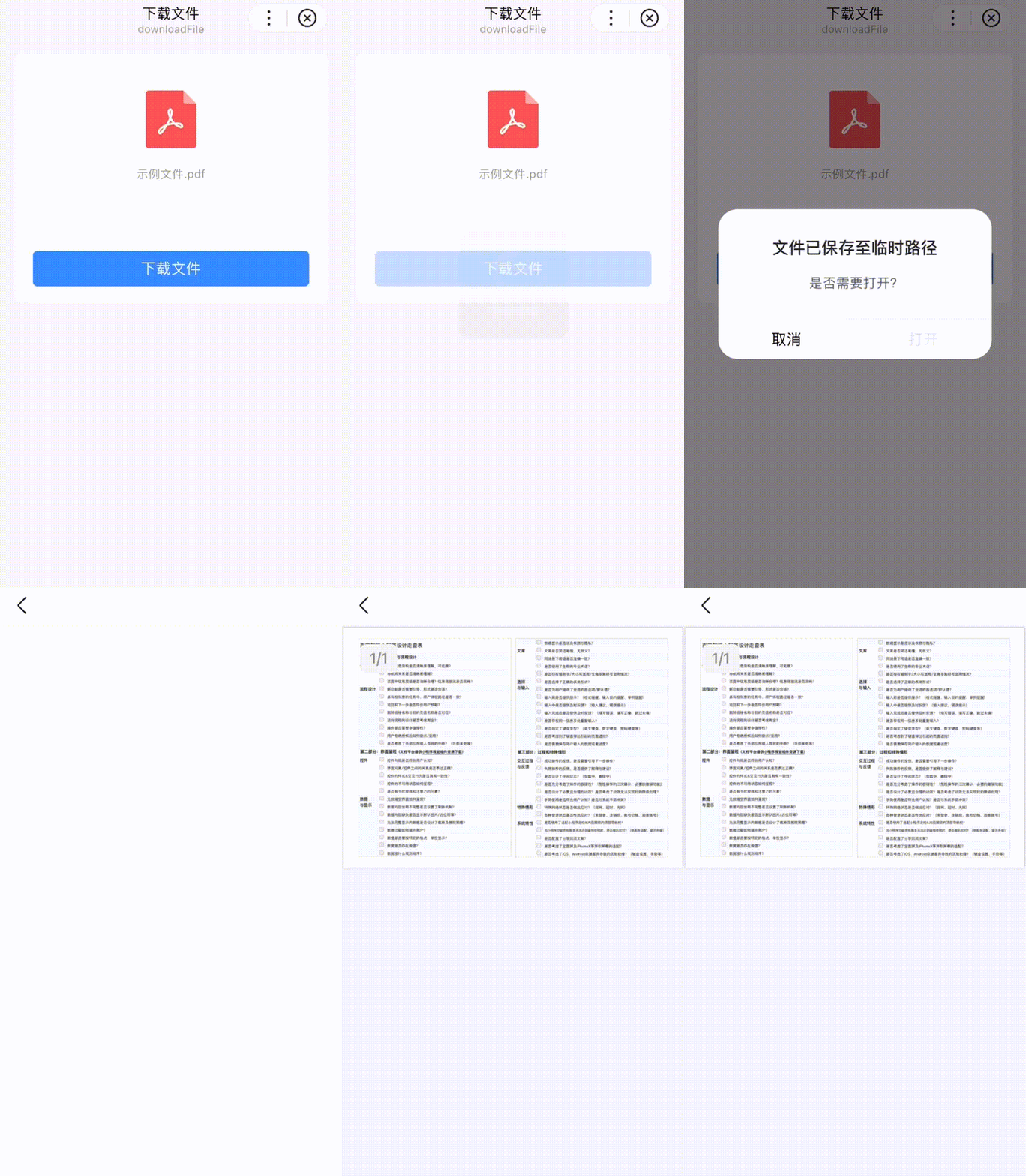
代码示例 1
- SWAN
- JS
<view class="wrap"><view class="card-area"><view class="display-area"><view><image class="file-icon" src="https://b.bdstatic.com/searchbox/icms/searchbox/img/file-pdf.png" mode="widthFix"></image></view><view class="tip-week">示例文件.pdf</view></view><button type="primary" bindtap="downloadFile">下载文件</button></view></view>
代码示例 2:指定下载路径
在开发者工具中打开
在开发者工具中打开
在 WEB IDE 中打开
- JS
Page({onLoad(e) {console.log('建议在真机查看效果');},downloadFile() {this.toast('正在保存', 'loading');swan.downloadFile({url: 'https://b.bdstatic.com/miniapp/assets/docs/sprddemofile-sample.pdf',header: {'content-type': 'application/json'},filePath: 'bdfile://usr/办理指南文档.pdf',success: res => {let filePath = res.filePath;swan.showModal({title: '文件下载完成',content: '是否需要打开?',confirmText: '打开',success: res => {if (res.confirm) {swan.openDocument({filePath: filePath,fileType: 'pdf',success: res => {console.log('openDocument', res)},fail: err => {console.log('openDocument', err)this.toast('打开失败');}});}}});},fail: err => {this.toast('下载文件失败');},complete: () => {swan.hideToast();}});},toast(title, icon = 'none') {swan.showToast({title, icon});}});
返回值:
返回一个 downloadTask 对象,通过 downloadTask ,可监听下载进度变化事件,以及取消下载任务。
Bug & Tip
- Tip:文件的临时路径,在智能小程序本次启动期间可以正常使用,如需持久保存,需再主动调用 swan.saveFile ,才能在智能小程序下次启动时访问得到。
- Tip:请在 Header 中指定合理的 Content-Type 字段,以保证客户端正确处理文件类型。
- Tip:下载最大限制 50MB 。
版权声明:
作者:后浪云
链接:https://idc.net/help/186749/
文章版权归作者所有,未经允许请勿转载。
THE END