
后浪云百度小程序教程:swan.setNavigationBarTitle

- swan.setNavigationBarTitle
- 方法参数
- object 参数说明
- 示例
- 代码示例
- 错误码
- Android
- iOS
- 方法参数
swan.setNavigationBarTitle
解释:动态设置当前页面的标题,设计文档详见顶部导航栏。如需更多自定义导航样式,可使用 Smart UI 组件,详见 navigation 自定义导航。
方法参数
Object object
object 参数说明
| 属性名 | 类型 | 必填 | 默认值 | 说明 |
|---|---|---|---|---|
title | String | 是 | 页面标题 | |
success | Function | 否 | 接口调用成功的回调函数 | |
fail | Function | 否 | 接口调用失败的回调函数 | |
complete | Function | 否 | 接口调用结束的回调函数(调用成功、失败都会执行) |
示例
跳转编辑工具
在开发者工具中打开
在 WEB IDE 中打开
扫码体验
代码示例

请使用百度APP扫码
代码示例
- SWAN
- JS
<view class="wrap"><view class="card-area"><input bind:input="titleInput" class="input border-bottom" type="text" placeholder="请输入页面标题并点击设置即可"/><button bind:tap="setNavigationBarTitle" type="primary" hover-stop-propagation="true">设置框架标题</button></view></view>
设计指南
页面标题要和页面内容相对应,最多显示 8 个字,超出会被截断,建议措辞精简。若小程序使用 tabBar ,切换 tab 时,页面标题应跟随 tab 内容变更。
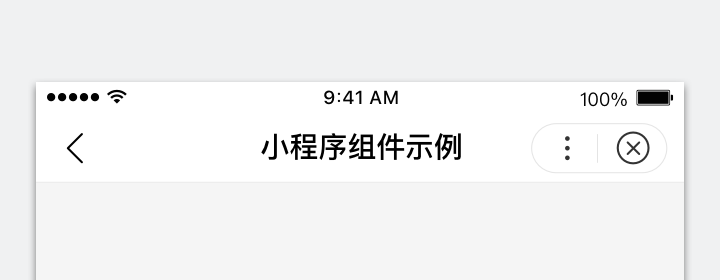
正确
页面标题简洁易懂
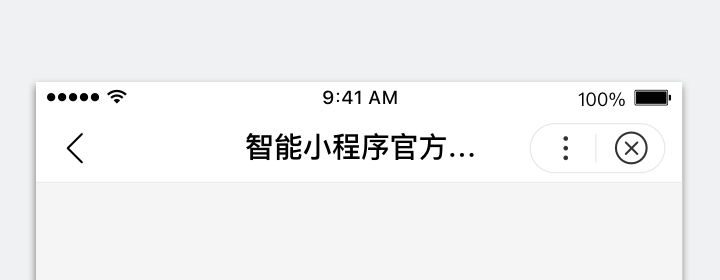
错误
标题过长显示不全,导致信息缺失
错误码
Android
| 错误码 | 说明 |
|---|---|
1001 | 执行失败 |
iOS
| 错误码 | 说明 |
|---|---|
202 | 解析失败,请检查参数是否正确 |
版权声明:
作者:后浪云
链接:https://idc.net/help/186715/
文章版权归作者所有,未经允许请勿转载。
THE END