
后浪云百度小程序教程:page-policy 政策文件库模板

- page-policy 政策文件库模板
- 示例
- 页面内容
- 政策文件列表页
- 政策文件详情页
- 我的收藏页面
- 我的订阅页面
- 搜索页
- 自定义 UI 组件
- npm 依赖
- Bug & Tip
page-policy 政策文件库模板
从开发者工具 v2.25.1-rc 版本开始支持。
解释:本模板适用于信息公开类小程序的快速搭建,可应用于办税指南、法律宝典、街道信息公告通知等场景,可将信息结构化的呈现给用户,方便用户快速阅读获取有效的信息。
示例
扫码体验
代码示例

请使用百度APP扫码
页面内容
模板包含政策文件列表页、政策文件详情页、收藏列表页以及订阅列表页、搜索结果页。
政策文件列表页
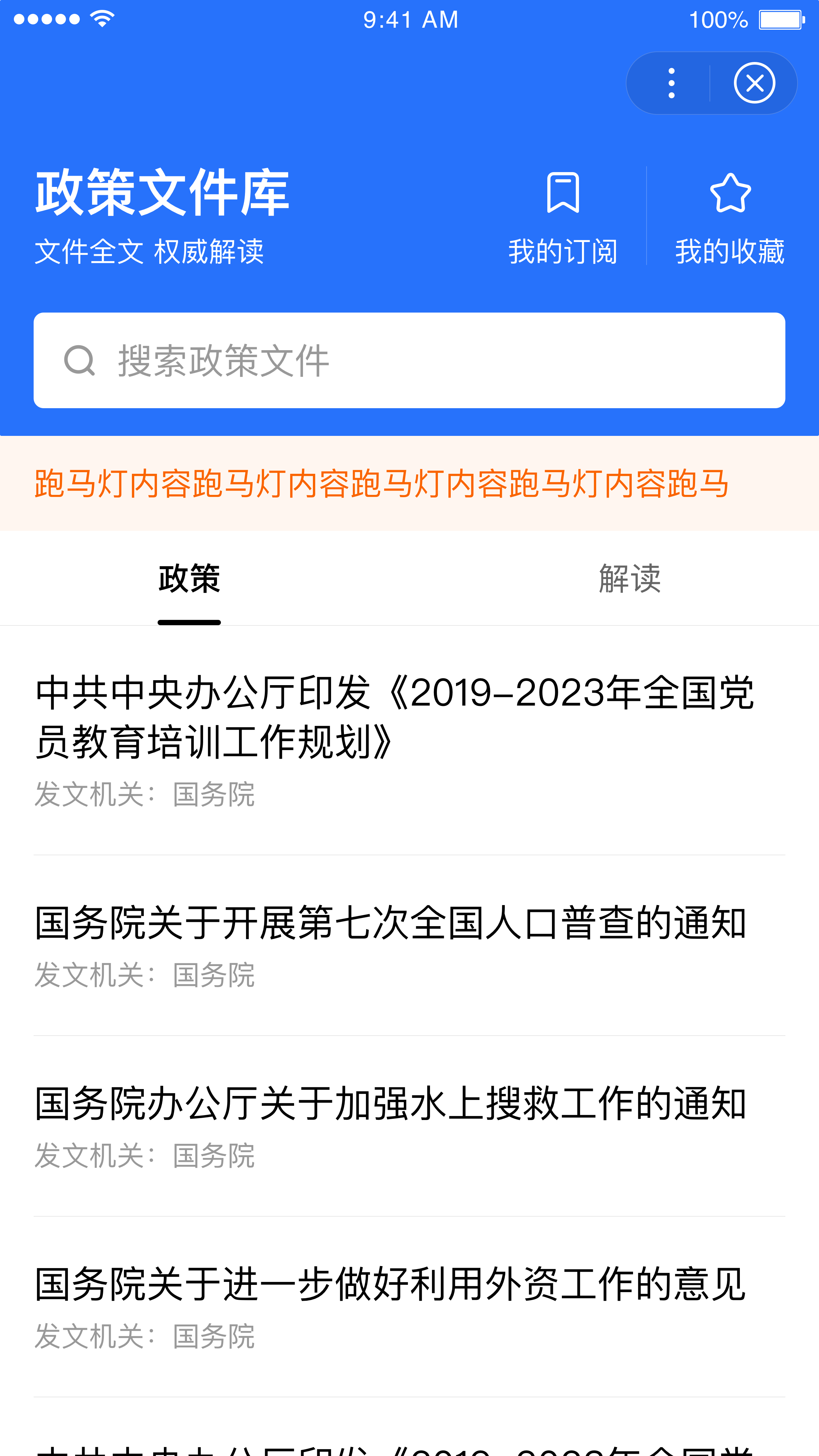
政策文件列表页包含搜索以及筛选组件,用户可以快速获取所需要的信息,同时页面包含跑马灯组件、tab 切换组件可实现信息轮播提示、板块切换等交互效果,丰富页面功能,提升使用体验。
页面路径:pages/indexFilter/index、pages/indexTab/index
列表页提供了筛选器和 tab 两种效果样式。其中,pages/indexFilter/index 是带筛选器的模板页,pages/indexTab/index 是带 tab 切换的模板页。如果想查看不同的模板类型,可以修改小程序根目录下的 app.json 文件,将对应类型的模板页面路径放到第一个。

代码示例
以下是使用筛选器的首页模板代码:
SWAN
- JSON
- JS
<view class="index-filter {{isIPhoneX ? 'iphone-x-compitable' : ''}} {{isOpenFilter ? 'locked' : ''}}"><zw-custom-title-barclass='policy-home-filter'common-bg-opacity="{{true}}"common-front-color="#ffffff"fixed-title="政策文件库"need-to-return="{{false}}"fixed-text-align="center"common-text-align="left"fixed-bg-color="#ffffff"common-bg-color="#2772fb"fixed-front-color="#000000"fixed-has-border="{{true}}"common-has-border="{{false}}"show-fixed-bar="{{true}}"namespace="policy-home-filter"></zw-custom-title-bar><view class="security-style" style="height:{{security}}"></view><view class="header"><view class="app-handle"><view class="app"><view class="row-main app-title">政策文件库</view><view class="row-sub">文件全文 权威解读</view></view><view class="handle"><view class="handle-item"><view class="row-main handle-icon" bindtap="gotoSubscribe"><zw-icon name="subscribe" size="{{iconsize}}" color="#fff" class="icon-1"/></view><view class="row-sub">我的订阅</view></view><view class="handle-item"><view class="row-main handle-icon" bindtap="gotoCollect"><zw-icon name="no-collect" size="{{iconsize}}" color="#fff" class="icon-2"/></view><view class="row-sub">我的收藏</view></view></view></view><view class="search" bindtap="gotoSearch"></view></view><view class="notice-wrap" s-if="notice.text"><zw-notice-bar text="{{notice.text}}" bind:close="noticeClose" bind:clicknotice="clicknotice"/></view><view class="content"><view class="filter-section" s-if="{{filter.length}}"><zw-filters-for="item, findex in filter"title="{{item.title}}"class="filter"mask-with-animation="{{false}}"bind:openFilter="openFilter"max-title-width="123.79"is-immersive><zw-filter-items-for="sub,index in item.children"bind:change="changeFilter"value="{{findex + ':' + sub.id}}"text="{{sub.name}}" /></zw-filter></view><view class="filter-content {{notice ? 'smaller' : 'normal'}}"><zw-loading s-if="showLoading" zw-loading-status-class="custom-loading"><view slot="text">正在加载...</view></zw-loading><zw-state-page show-reload="{{stateBtn}}" type="{{errStatus}}" bind:reload="reload" zw-state-page-class="custom-state" fixed="{{false}}" s-if="{{errStatus !== ''}}"/><block s-if="isLoaded"><view class="feed-content"><block s-for="page in list"><zw-list-items-for="item, index in page"title="{{item.title}}"desc="{{'发文机关:' + item.office}}"clickable="{{true}}"data-aid="item.id"bind:tap="gotoArticle"/></block><zw-spin status="{{status}}" bind:tap="reloadFeed" s-if="showStatus" zw-spin-class="custom-spin"></zw-spin><zw-footer s-if="feedEnd" zw-footer-class="custom-footer"><view class="footer-txt">单行footer</view></zw-footer></view></block></view></view></view>
{"navigationBarTitleText": "政策文件库","navigationStyle": "custom","backgroundColor": "#ffffff","backgroundColorTop": "#2772fb","navigationBarBackgroundColor": "#ffffff","navigationBarTextStyle": "white","onReachBottomDistance": 34,"usingComponents": {"zw-custom-title-bar": "../../components/CustomTitleBar/src/index","zw-notice-bar": "../../components/NoticeBar/src/index","zw-footer": "../../components/Footer/src/index","zw-icon": "../../components/Icon/src/index","zw-loading": "../../components/LoadingStatus/src/index","zw-state-page": "../../components/StatePage/src/index","zw-list-item": "../../components/ListItem/src/index","zw-spin": "../../components/Spin/src/index","zw-filter": "../../components/Filter/src/index","zw-filter-item": "../../components/FilterItem/src/index"}}
// 获取列表数据,以下为使用 mock 数据的请求示例getHomeList(query, ({code, msg, data}) => {if (code === 0) {// 设置筛选器数据!filter.length && (res.filter = data.filter);// 更新通知栏内容!notice && !this.data.hideNotice && data.notice && (res.notice = data.notice);// ...}else {// 请求异常处理}}),// 跳转到文章详情页。跳转携带的 id 参数只是 mock 数据举例,是否需要带参数跳转以及参数名称、参数值均可自定义gotoArticle(e) {const index = e.currentTarget.dataset.aid;navigateTo({url: `../article/article?id=${index}`});}
政策文件详情页
分为标题以及文字信息区域,可将图文等内容结构化呈现,方便用户阅读。
页面路径:pages/article/article

代码示例
- SWAN
- JSON
- JS
<view class="article-wrapper"><zw-loading s-if="showLoading"><view slot="text">正在加载...</view></zw-loading><zw-state-page show-reload="{{stateBtn}}" type="{{errStatus}}" s-if="errStatus !== ''" bind:reload="reload"/><block s-if="isLoaded"><view class="{{isIPhoneX ? 'iphone-x-compitable' : '' }}"><view class="main-container"><view class="main-content"><view class="content"><view class="article-desc" bindtap="changeExpand"><view class="article-title">{{detail.title}}</view><view class="article-info {{expand.length ? 'nomargin' : ''}}" ><view class="info-item"><view class="info-name">{{detail.info[0].name}}</view><view class="info-value">{{detail.info[0].value}}</view></view></view><view class="expand-icon"><zw-icons-if="{{expand.length > 0}}"name="arrow-{{!expandStatus ? 'down' : 'up'}}"color="#ccc"size="{{actionFontSize}}"></zw-icon></view></view><viewclass="expand-area" s-if="{{expand.length > 0}}"style="height: {{expandStatus ? expandHeight : 0}}px;"><view class="expand-area-inner"><view class="info-item" s-for="item in expand"><view class="info-name">{{item.name}}</view><view class="info-value">{{item.value}}</view></view></view></view><rich-text nodes="{{detail.content}}" selectable="true"></rich-text><view class="subscribe border border-top"><zw-list-itemtitle="{{detail.hoster}}"desc="{{detail.desc}}"clickable="{{false}}"zw-list-item-wrap-class="custom-list"no-border><slot><view class="btn-wrap" ><zw-buttonbutton-size="xs-small"button-color="{{detail.status ? 'secondly' : 'thirdly'}}"button-text="{{detail.status ? '已订阅' : '订阅'}}"bindtap="changeSub"/></view></slot></zw-list-item></view></view><view class="footer {{isIPhoneX ? 'iphone-x-compitable' : '' }} border border-top {{!isIos ? 'android-patch': ''}}"><view class="footer-inner"><view class="actions-list" ><view class="action" bind:tap="addCollection"><zw-icon class="icon" name="{{detail.collected ? 'collect-color' : 'collect-thin'}}" size="{{iconSize}}"></zw-icon>{{detail.collected ? '已收藏' : '收藏'}}</view></view><view class="actions-list" ><view class="action" bind:tap="toShare"><zw-icon class="icon" name="share" size="{{iconSize}}"></zw-icon>分享</view></view></view></view></view></view></view></block></view>
{"navigationBarBackgroundColor": "#ffffff","navigationBarTextStyle": "black","navigationBarTitleText": "政策文件库","backgroundColor": "#ffffff","backgroundTextStyle": "light","usingComponents": {"zw-loading": "../../components/LoadingStatus/src/index","zw-state-page": "../../components/StatePage/src/index","zw-button": "../../components/Button/src/index","zw-icon": "../../components/Icon/src/index","zw-list-item": "../../components/ListItem/src/index"}}
// 请求接口,获取文件详情getArticle(({code, msg, data}) => {// 请求正常响应if (code === 0) {// ...}// 请求异常else {// ...}}),// 切换订阅状态changeSub(e) {// 获取当前订阅状态const status = this.data.detail.status;// 请求接口,切换订阅状态changeStatus(status, ({code, data}) => {// 请求正常响应if (code === 0) {// 更新订阅状态}});},// 切换收藏状态addCollection(e) {// 获取当前收藏状态const status = this.data.detail.collected;// 请求接口,切换收藏状态changeStatus(status, ({code, data}) => {// 请求正常响应if (code === 0) {// 更新收藏状态}});},// 分享的标题、内容、路径、图片地址,分享成功、分享失败的回调都可以根据实际业务场景和需求自定义。toShare() {swan.openShare({title: '政策文件库分享示例',content: '中共中央办公厅印发《2019-2023年全国党员教育培训工作规划》',path: '/templates/gov/policy/pages/article/article?key=' + this.data.articleId,imageUrl: 'https://ms-static.cdn.bcebos.com/miniappdocs/img/logo_new.png',success: res => {swan.showToast({title: '分享成功'});console.log('openShare success', res);},fail: err => {console.log('openShare fail', err);}});}
我的收藏页面
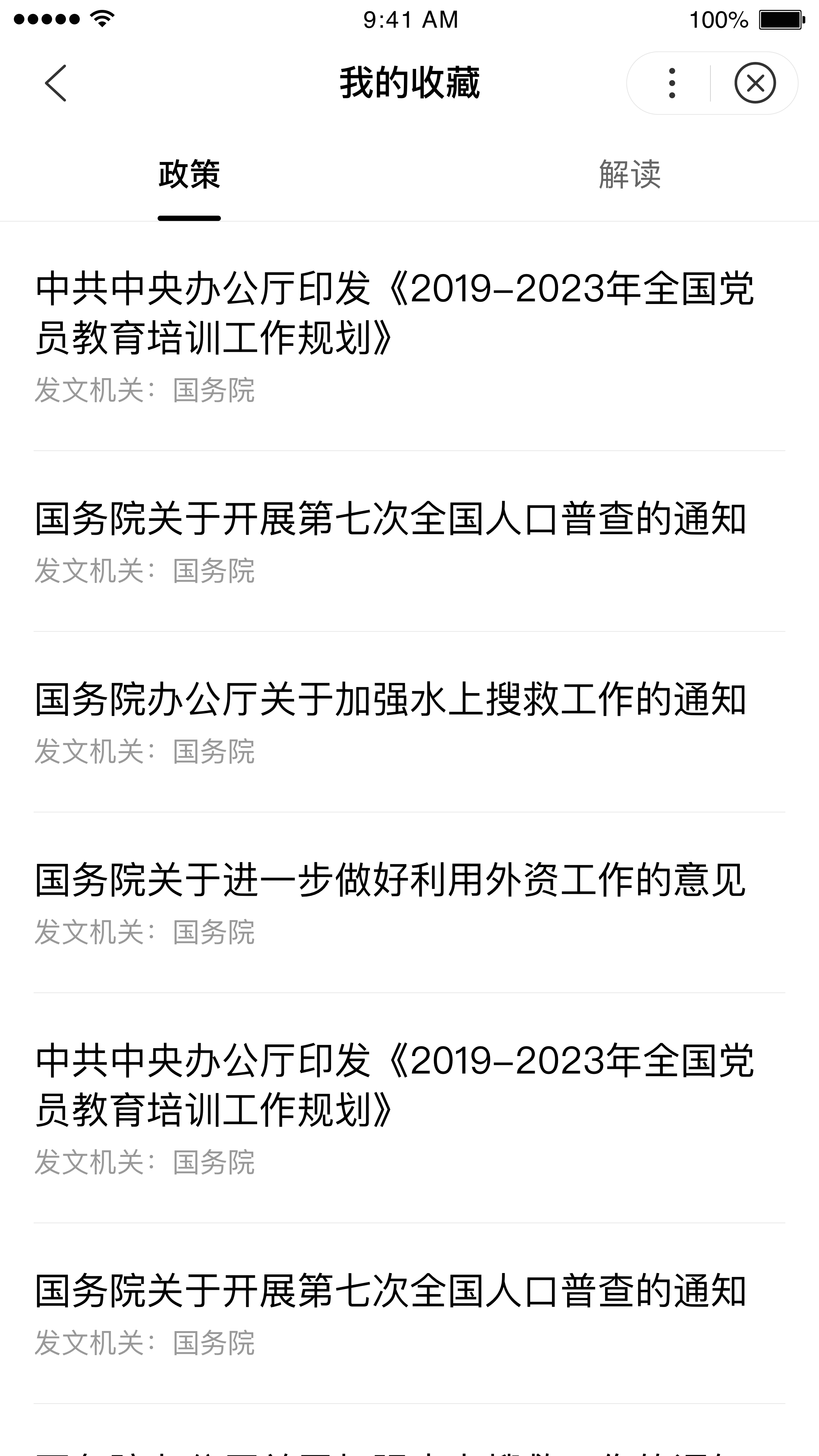
用户收藏过的内容将通过一定的顺序呈现在收藏列表页,对于重点关注的内容,用户无需反复检索,在收藏列表页可直接阅读。
页面路径:pages/collect/collect
代码示例
- SWAN
- JSON
- JS
<view class="collect-wrapper"><zw-tabstabs="{{tabs}}"type="flex"mode="auto"active-tab="{{0}}"nav-bar-width="100%"show-with-animation="{{false}}"bindonChange="onCustomTabChange"/><view class="tab-content {{activeName === 'zc' ? 'show' : 'hide'}} {{isIPhoneX ? 'iphone-x-compitable' : ''}}"><zw-loading s-if="zc.showLoading"><view slot="text">正在加载...</view></zw-loading><zw-state-page show-reload="{{zc.stateBtn}}" type="{{zc.errStatus}}" s-if="zc.errStatus !== ''" bind:reload="reloadZc" zw-state-page-class="custom-state" fixed="{{false}}"/><block s-if="zc.isLoaded"><!-- 上拉加载 --><smt-feedclass="smt-feed click-zc-refresh"data-type="zc"bind:scrolltolower="autoScrollToLower"><block s-for="page in zc.list"><zw-list-items-for="item, index in page"title="{{item.title}}"desc="{{'发文机关:' + item.office}}"clickable="{{true}}"data-aid="item.id"bind:tap="gotoArticle"/></block><zw-spin status="{{zc.status}}" bind:tap="reloadZcFeed" zw-spin-class="custom-spin"></zw-spin></smt-feed></block></view><view class="tab-content {{activeName === 'jd' ? 'show' : 'hide'}} {{isIPhoneX ? 'iphone-x-compitable' : ''}}"><zw-loading s-if="jd.showLoading"><view slot="text">正在加载...</view></zw-loading><zw-state-page show-reload="{{jd.stateBtn}}" type="{{jd.errStatus}}" s-if="jd.errStatus !== ''" bind:reload="reloadJd" zw-state-page-class="custom-state" fixed="{{false}}"/><block s-if="jd.isLoaded"><!-- 上拉加载 --><zw-feedclass="smt-feed click-jd-refresh"data-type="jd"bind:scrolltolower="autoScrollToLower"><block s-for="page in jd.list"><zw-list-items-for="item, index in page"title="{{item.title}}"desc="{{'发文机关:' + item.office}}"clickable="{{true}}"data-aid="{{item.id}}"bind:tap="gotoArticle"/></block><zw-spin status="{{jd.status}}" bind:tap="reloadJdFeed" zw-spin-class="custom-spin"></zw-spin></zw-feed></block></view></view>
{"navigationBarBackgroundColor": "#fffffe","navigationBarTextStyle": "black","navigationBarTitleText": "我的收藏","backgroundColor": "#ffffff","backgroundTextStyle": "light","usingComponents": {"zw-loading": "../../components/LoadingStatus/src/index","zw-state-page": "../../components/StatePage/src/index","zw-list-item": "../../components/ListItem/src/index","smt-feed": "@smt-ui/component/src/feed","zw-spin": "../../components/Spin/src/index","zw-tabs": "../../components/Tabs/src/index"}}
// 请求接口,获取收藏数据getCollectList(name, ({code, msg, data}) => {if (code === 0) {// 请求正常响应处理}else {// 请求异常处理}}),// 跳转到文章详情页。跳转携带的 id 参数只是 mock 数据举例,是否需要带参数跳转以及参数名称、参数值均可自定义gotoArticle(e) {const index = e.currentTarget.dataset.aid;navigateTo({url: `../article/article?id=${index}`});}
我的订阅页面
开发者可结合自身业务,向用户提供订阅功能。对于订阅后的内容或板块,用户无需反复检索,在订阅列表页可直接获取最新资讯。
页面路径:pages/subscribe/subscribe

代码示例
- SWAN
- JSON
- JS
<view class="subscribe-wrap swan-security-padding-bottom"><zw-loading s-if="showLoading"><view slot="text">正在加载...</view></zw-loading><zw-state-pages-if="errStatus !== ''"show-reload="{{stateBtn}}"type="{{errStatus}}"bind:reload="reload"/><view s-if="isLoaded"><zw-list-items-for="item, index in subList"title="{{item.title}}"desc="{{item.desc}}"clickable="{{false}}"data-index={{index}}bind:tap="gotoArticle"><slot><view class="btn-wrap" ><zw-buttonbutton-size="xs-small"button-color="{{item.status ? 'secondly' : 'thirdly'}}"button-text="{{item.status ? '已订阅' : '订阅'}}"data-index="{{index}}"catchtap="changeSub"/></view></slot></zw-list-item></view></view>
{"navigationBarBackgroundColor": "#ffffff","navigationBarTextStyle": "black","navigationBarTitleText": "我的订阅","backgroundColor": "#ffffff","backgroundTextStyle": "light","usingComponents": {"zw-list-item": "../../components/ListItem/src/index","zw-loading": "../../components/LoadingStatus/src/index","zw-state-page": "../../components/StatePage/src/index","zw-button": "../../components/Button/src/index"}}
// 请求接口,获取关注列表数据getList(({code, msg, data}) => {if (code === 0) {// 请求正常响应处理}else {// 请求异常处理}}),// 切换订阅状态changeSub(e) {// 获取当前订阅状态const status = this.data.subList[index].status;changeStatus(status, ({code, data}) => {// 请求正常响应if (code === 0) {// 更新订阅状态}});},// 跳转到文章详情页。跳转携带的 id 参数只是 mock 数据举例,是否需要带参数跳转以及参数名称、参数值均可自定义gotoArticle(e) {const index = e.currentTarget.dataset.aid;navigateTo({url: `../articleList/articleList?id=${index}`});}
搜索页
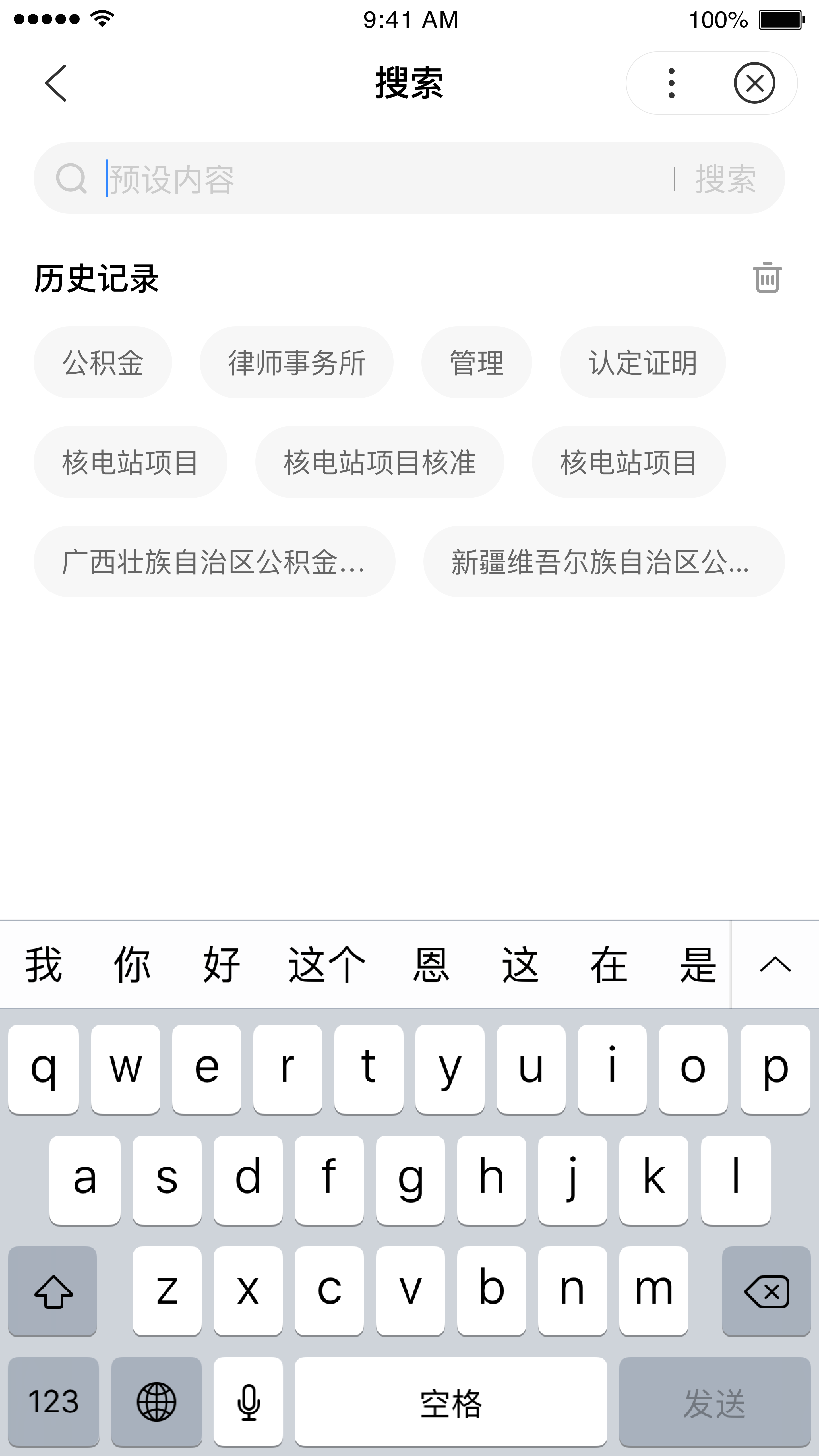
用户触发搜索功能后将跳转至搜索页,页面包含搜索历史以及搜索结果两部分。搜索结果高亮显示,方便用户辩识获取有效信息;搜索历史结构化呈现,方便用户再次进行检索。对于搜索历史,也可使用“清空”进行删除。
页面路径:pages/search/search

代码示例
- SWAN
- JSON
- JS
<view class="search-wrapper"><zw-custom-title-barshow-fixed-bar='{{false}}'fixed-title="搜索"fixed-front-color="#000000"common-front-color="#000000"common-bg-color='#ffffff'fixed-bg-color='#ffffff'common-bg-opacity="{{false}}"need-to-return="{{true}}"common-title="搜索"bind:navhome="navhome"/><view class="search-component clear"><view class="search-bar border border-bottom {{!isIos ? 'android-patch': ''}}"><zw-search-barclass='search-bar-component'value="{{value}}"focus="{{focusing}}"placeholder="{{placeholder}}"confirm-type="{{confirmType}}"search-text-color="{{searchTextColor}}"bindfocus="focusHdl"bindblur="blurHdl"bindinput="iptHdl"bindconfirm="searchBtnHdl"bindclear="emptyHdl"bindsearch="searchBtnHdl"/></view><!-- 状态 --><view class="status-content" s-if="showLoading || errStatus !== ''"><zw-loading s-if="showLoading" zw-loading-status-class="custom-loading"><view slot="text">正在加载...</view></zw-loading><zw-state-pages-if="errStatus !== ''"fixed="{{false}}"show-reload="{{errStatus === 'noNetwork' || errStatus === 'warning'}}"type="{{errStatus}}"bind:reload="reload" class-name="custom-state"/></view><viewclass="search-body"s-if="!showLoading"><!-- 历史搜索+热门搜索 --><viewclass="history-info"s-if="!value && !resultState"><block s-if="searchInfo.info.length > 0"><view class="history-title"><text>{{searchInfo.title}}</text><zw-icons-if="searchInfo.delete"name="trash"size="{{iconsize}}"bindtap="deleteHis"color="#999"/></view><view class="history-body {{searchInfo.delete ? 'history-body-shrink' : ''}}"><viewclass="history-item"s-for="info in searchInfo.info"hover-class="list-hover-feedback"hover-stay-time="{{240}}"bindtap="itemSelect"data-item="{{info}}"data-type="{{item.type}}"><text>{{info}}</text></view></view></block></view><!-- 搜索结果 --><viewclass="result"s-if="resultState"><view s-for="item, index in list"><zw-list-itemtitle="{{item.title}}"desc="{{'发文机关:' + item.office}}"clickable="{{true}}"data-aid="item.id"bind:tap="gotoArticle"><view slot="title"><rich-text nodes="{{item.title}}" selectable="true" /></view></zw-list-item></view></view></view></view></view>
{"navigationBarTitleText": "搜索","navigationBarBackgroundColor": "#ffffff","navigationBarTextStyle": "black","navigationStyle": "custom","enablePullDownRefresh": false,"usingComponents": {"zw-search-bar": "../../components/SearchBar/src/index","zw-state-page": "../../components/StatePage/src/index","zw-icon": "../../components/Icon/src/index","zw-loading": "../../components/LoadingStatus/src/index","zw-custom-title-bar": "../../components/CustomTitleBar/src/index","zw-list-item": "../../components/ListItem/src/index"}}
onLoad() {// 从缓存中获取历史记录let searchInfo = {};swan.getStorage({key: this.data.historyStorageName,success: res => {const localHistory = res.data;if (localHistory) {// 处理缓存的历史数据}},fail: () => {// 获取缓存异常处理}});},// 将历史搜索存入 Storage,缓存搜索历史saveHistory(text) {// 设置搜索历史缓存swan.setStorage({key: this.data.historyStorageName,exp: 60 * 24 * 60 * 60 * 1000,data: history});},// 删除历史记录,可直接通过清除缓存数据来删除搜索历史deleteHis() {// 弹窗二次确认swan.showModal({title: '清空搜索历史',content: '数据清空后,相关内容无法恢复',confirmText: '确认清空',cancelText: '取消',success: res => {// 确认清空if (res.confirm) {this.setData({'searchInfo.info': []});// 移除缓存数据swan.removeStorageSync(this.data.historyStorageName);}}});},// 格式化搜索结果数据。搜索词高亮处理,高亮处理也可以直接放在接口处理,接口返回带样式的内容放在富文本展示。示例中的高亮词是mock数据。fomateValue(value) {const arr = value.split('<em');return arr.map(item => {if (item.indexOf('>') > -1) {const result = item.slice(item.indexOf('>') + 1);return result.split('</em>').join('');}return item;}).join('');},// 请求接口,获取搜索结果getResult(query, isSaveHis = false) {// 是否要保存历史记录isSaveHis && this.saveHistory(query);getSearchList(this.data.activeName, ({code, msg, data}) => {if (code === 0) {// 接口正常响应处理}else {// 接口异常处理}});},// 回到小程序的首页,url 路径可根据实际路径替换navhome() {navigateTo({url: '../indexTab/index'});},// 跳转到文章详情页。跳转携带的 id 参数只是 mock 数据举例,是否需要带参数跳转以及参数名称、参数值均可自定义gotoArticle(e) {const index = e.currentTarget.dataset.aid;navigateTo({url: `../article/article?id=${index}`});}
自定义 UI 组件
在政策文件库中,用到了如下自定义 UI 组件:
| 组件名称 | 路径 | 说明 |
|---|---|---|
| Button 按钮组件 | components/Button | 按钮组件支持设置尺寸、文案、文字颜色、背景颜色、禁用置灰等 |
| CustomTitleBar 沉浸式导航栏组件 | components/CustomTitleBar | 沉浸式导航栏组件可实现导航栏通栏配置,上滑、下拉导航栏渐变切换效果 |
| Filter、FilterItem 筛选器组件 | components/Filter、components/FilterItem | 筛选器组件可以满足多条件筛选场景,支持多列筛选。Filter 组件需要配合 FilterItem 组件使用 |
| Footer 页脚组件 | components/Footer | 页脚组件可自定义页脚内容 |
| Icon 组件 | components/Icon | 图标组件,可设置不同图标类型、图标大小和颜色 |
| ListItem 列表项组件 | components/ListItems | 列表项组件 |
| LoadingStatus 加载态组件 | components/LoadingStatus | 可设置加载态的主题色、文案颜色 |
| NoticeBar 跑马灯组件 | components/NoticeBar | 跑马灯组件可以自动广播提示消息 |
| SearchBar 搜索框组件 | components/SearchBar | 搜索框组件支持保存搜索历史、删除搜索历史、清空搜索内容、搜索结果词高亮显示等功能 |
| Spin 加载组件 | components/Spin | 加载组件用于展示上拉加载状态,显示加载态内容,包括点击加载、正在加载、加载完成、重新加载四种状态 |
| StatePage 状态页组件 | components/StatePage | 状态页组件用于设置页面的不同展现状态,如无网络、无数据,还可配合描述文案、重新加载按钮一起使用 |
| Tabs 组件 | components/Tabs | Tabs 组件可以满足在不同视图内容中进行切换 |
npm 依赖
| 名称 | 版本号 |
|---|---|
| @smt-ui/component | latest |
Bug & Tip
- Tip:该模板使用了 ES6 语法,需要开启开发者工具的增强编译,操作步骤参看开启说明;同时也需开启
上传代码时样式自动补全。 - Tip:以上代码示例为纯客户端代码,可直接在模拟器和真机预览。
- Tip:模板中使用的是测试数据,你需要从接口中获取真实的数据。