
后浪云百度小程序教程:swan.request

- swan.request
- 方法参数
- object 参数说明
- 使用缓存服务时 success 返回参数说明
- 未使用缓存服务时 success 返回参数说明
- 使用缓存服务时 fail 返回参数说明
- 未使用缓存服务时 fail 返回参数说明
- 示例
- 图片示例
- 代码示例 1:使用了云端缓存服务能力
- 代码示例 2:云端缓存服务能力接入开发者服务
- 代码示例 3:post 的 header[‘content-type’] 为 application/json
- 代码示例 4:post 的 header[‘content-type’] 为 application/x-www-form-urlencoded
- 代码示例 5:post 的 header 中携带 cookie
- 代码示例 6:post 的 dataType 为 string
- 代码示例 7:post 的 data 为 string
- 代码示例 8:post 的 responseType 为 arraybuffer
- 代码示例 9:post 的 method 为 GET
- 代码示例 10:post 的 method 为 PUT
- 代码示例 11:post 的 method 为 DELETE
- 代码示例 12:post 的 method 为 HEAD
- 代码示例 13:post 的 method 为 OPTIONS
- 代码示例 14:防止用户快速点击,多次请求(加锁)
- 代码示例 15:promise 写法保障 request 的请求顺序
- 常见问题
- Q:request 请求在 iOS 端会进入 fail 回调函数的原因有哪些?
- Q:request 请求在 iOS 端会进入 fail 回调函数的原因有哪些?
- 方法参数
swan.request
请参考使用注意事项进行开发。
解释:发起网络请求。
方法参数
Object object
object 参数说明
| 属性名 | 类型 | 必填 | 默认值 | 说明 | 最低支持版本 | Web 态说明 |
|---|---|---|---|---|---|---|
| url | String | 是 | 1、开发者服务域名 + path + query(未开启云端缓存服务能力) 2、缓存服务域名 + path + query (开启云端缓存服务能力),其中缓存服务域名为:https://storage.smartapps.cn ,请求先转发到缓存服务,缓存服务未命中后,再转发到开发者服务 | |||
| data | Object/String | 否 | 请求的参数 | |||
| header | Object | 否 | 设置请求的 header:header 中不能设置 Referer ;若开启缓存服务,需要设置 Developer-Server-Domain ,该 key 存储开发者服务器的域名地址 | |||
| method | String | 否 | GET (大写) | 开启云端缓存服务能力的有效值:HEAD、GET、POST ; 未开启云端缓存服务能力的有效值:OPTIONS、GET、HEAD、POST、PUT、DELETE、TRACE/CONNECT(仅 Android 支持) | 有效值:HEAD、GET、POST、PUT、DELETE | |
| dataType | String | 否 | json | 有效值:string、json、jsonp 。如果设为 json ,会尝试对返回的数据做一次 JSON.parse | 有效值:string、json、jsonp 。如果设为 jsonp ,客户端会发送如: https://sfc.baidu.com/shopping/nianhuo/bimai?SwanWebCallback=SwanWebCallback1599623580951_6 的请求,服务端返回数据时需要将 SwanWebCallback 参数的值作为函数名来包裹住 JSON 数据 | |
| responseType | String | 否 | text | 设置响应的数据类型,有效值:text、arraybuffer | 1.11.20 | |
| success | Function | 否 | 收到开发者服务成功返回的回调函数 | |||
| fail | Function | 否 | 接口调用失败的回调函数 | |||
| complete | Function | 否 | 接口调用结束的回调函数(调用成功、失败都会执行) |
使用缓存服务时 success 返回参数说明
| 参数 | 类型 | 说明 |
|---|---|---|
| errno | String | 缓存服务返回,非 “0” 表示失败 |
| errmsg | String | 缓存服务返回,”succ” 或者错误提示信息 |
| logid | String | 缓存服务返回,缓存服务的日志 ID |
| data | String | 开发者服务器返回的数据,其中 data 为开发者服务 HTTP.Response.Body 进行 base64 编码后的数据 |
| header | Object | 开发者服务器返回的 HTTP Response Header |
| statusCode | Number | 开发者服务器返回的 HTTP 状态码 |
返回示例如下:
JSON
{"errno":"0","errmsg":"succ","logid":"64295237","data":"eyJkYXRhIjp7ImFwcF9saXN0IjpbeyJuYW1lIjoi6L+Z5piv5LiA5Liq5byA5Y+R6ICFc2VydmVy6L+U5Zue56S65L6LIn1dfSwiZXJybXNnIjoic3VjYyIsImVycm5vIjoiMCIsInJlcXVlc3RfaWQiOiIxMDI4MDkxODIiLCJ0aXBtc2ciOiIifQ==","header":{"Content-Type":["text/html"],"Date":["Thu, 10 Sep 2020 13:01:04 GMT"],"P3p":["CP=" OTI DSP COR IVA OUR IND COM "","CP=" OTI DSP COR IVA OUR IND COM ""],"Server":["Apache"],"Tracecode":["00644508330215533322091021","00644508330915916554091021"],"Vary":["Accept-Encoding"]}}
未使用缓存服务时 success 返回参数说明
| 参数 | 类型 | 说明 |
|---|---|---|
| data | Object/String | 开发者服务器返回的数据 |
| statusCode | Number | 开发者服务器返回的 HTTP 状态码 |
| header | Object | 开发者服务器返回的 HTTP Response Header |
使用缓存服务时 fail 返回参数说明
| 参数 | 类型 | 说明 |
|---|---|---|
| errno | String | 缓存服务返回,非 “0” 表示失败 |
| errmsg | String | 缓存服务返回,”succ” 或者错误提示信息 |
| logid | String | 缓存服务返回,缓存服务的日志 ID |
- 缓存服务错误码说明
| 错误码 | 说明 |
|---|---|
| 400000 | 使用缓存服务,输入不合法 |
| 400001 | 使用缓存服务,请求传入的开发者域名 Developer-Server-Domain 不合法 |
| 400002 | 请求 Header 缺少 Referer 字段 |
| 400003 | 请求 Header 的 Referer 中小程序 app_key 错误 |
| 400004 | 请求 Header 缺少 Developer-Server-Domain 字段 |
| 400005 | 小程序可以访问的开发者域名列表为空 |
| 400006 | 小程序请求的域名不在开发者在开发者平台配置的 Domains 域名列表内 |
| 500100 | 云端缓存服务内部错误 |
| 500101 | 云端缓存服务访问内部下游模块失败 |
| 502000 | 使用缓存服务,开发者服务失败 |
返回示例如下:
JSON
{"errno":"400000","errmsg":"invaild input","logid":"352381125"}
未使用缓存服务时 fail 返回参数说明
- Android
| 错误码 | 说明 |
|---|---|
| 201 | 解析失败,请检查调起协议是否合法 |
| 1001 | 执行失败 |
- iOS
| 错误码 | 说明 |
|---|---|
| 202 | 解析失败,请检查调起协议是否合法 |
| errorCode 为 4 | URL 无效 |
data 数据说明
最终发送给服务器的数据都是 String 类型,如果传入的 data 不是 String 类型,会被转换成 String 。转换规则如下:
1、对于 GET 方法的数据,会将数据转换成 query string(encodeURIComponent(k)=encodeURIComponent(v)&encodeURIComponent(k)=encodeURIComponent(v)…);
2、对于 POST 方法且 header[‘content-type’] 为 application/json 的数据,会对数据进行 JSON 序列化;
3、对于 POST 方法且 header[‘content-type’] 为 application/x-www-form-urlencoded 的数据,会将数据转换成 query string (encodeURIComponent(k)=encodeURIComponent(v)&encodeURIComponent(k)=encodeURIComponent(v)…)。
示例
扫码体验
代码示例

请使用百度APP扫码
图片示例
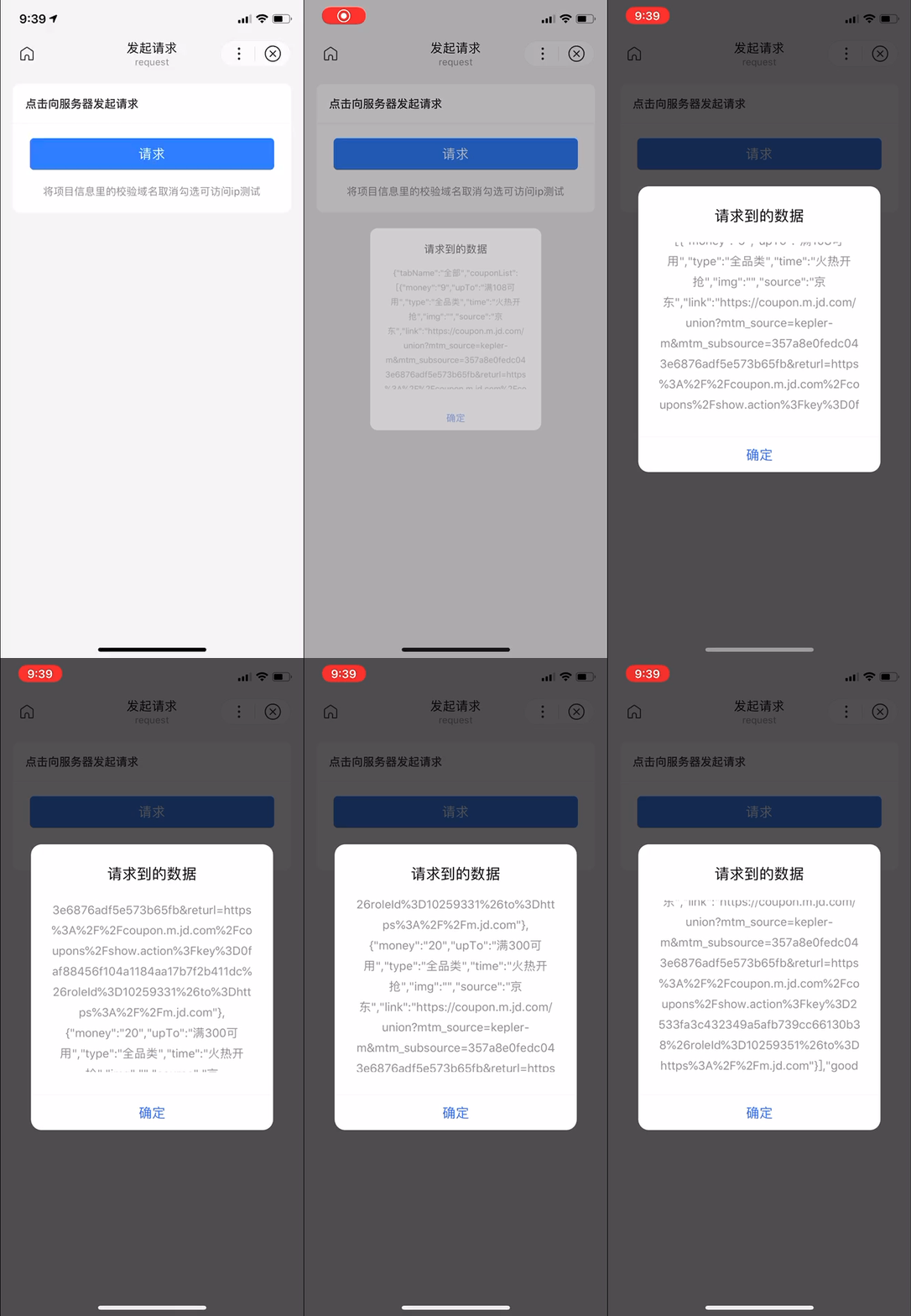
代码示例 1:使用了云端缓存服务能力
在开发者工具中打开
在开发者工具中打开
在 WEB IDE 中打开
- SWAN
- JS
<view class="wrap"><view class="card-area"><view class="top-description border-bottom">点击向服务器发起请求</view><button bind:tap="request" type="primary" loading="{{loading}}" hover-stop-propagation="true">button</button><view class="tip-week">将项目信息里的校验域名取消勾选可访问 ip 测试</view></view></view>
Page({data: {loading: false},request() {this.setData('loading', true);swan.request({url: 'https://storage.smartapps.cn/shopping/nianhuo/bimai',header: {'Content-Type': 'application/json','Developer-Server-Domain': 'https://sfc.baidu.com','X-SP-Accept-Encoding': 'base64','X-SP-Transfer-Encoding': '1'},method: 'POST',dataType: 'json',responseType: 'text',data: {tabname: '美食酒水'},success: res => {try {console.log('request success', res);swan.showModal({title: '请求到的数据',content: JSON.stringify(res.data),showCancel: false});}catch (error) {console.log(error);}},fail: err => {swan.showToast({title: JSON.stringify(err)});console.log('request fail', err);},complete: () => {this.setData('loading', false);}});}});
代码示例 2:云端缓存服务能力接入开发者服务
在开发者工具中打开
在开发者工具中打开
在 WEB IDE 中打开
- SWAN
- JS
- REQUEST.JS
<view class="wrap"><view class="card-area"><view class="tip-strong">开发者接入使用此能力需要在开发者管理平台(https://smartprogram.baidu.com/developer/applist.html)配置开关后,按照 js 中标注引入</view><view class="top-description border-bottom">点击向服务器发起请求</view><button bind:tap="request" type="primary" loading="{{loading}}" hover-stop-propagation="true">button</button><view class="tip-week">将项目信息里的校验域名取消勾选可访问 ip 测试</view></view></view>
/*** 开发者原有的业务文件*/// 1、添加 util 文件里的 request.js,并在此引入let util = require('../util/request.js');Page({data: {loading: false},request() {// 2、将 swan.request 替换为 swan.requestStorage1,注:此处应防止 API 重名问题,注意设为唯一标识swan.requestStorage1 = util.requestStorage;swan.requestStorage1({// swan.request({url: 'https://sfc.baidu.com/shopping/nianhuo/bimai',data: {tabname: '美食酒水'},header: {'Content-Type': 'application/json'},method: 'POST',dataType: 'JSON',responseType: 'text',success: res => {this.setData('loading', true);swan.showModal({title: 'success',content: JSON.stringify(JSON.parse(res.data).data)});console.log('request success', JSON.parse(res.data).data);},fail: err => {swan.showToast({title: JSON.stringify(err)});console.log('request fail', err);},complete: () => {this.setData('loading', false);console.log('request complete');}});}});
/*** 云端缓存 request 封装*/function requestStorage({url, header, success, fail, complete, ...param}) {const {oldHost, newHost} = parseUrl(url);// header 字段的添加const newHeader = Object.assign(header, {'Developer-Server-Domain': oldHost,'X-SP-Accept-Encoding': 'base64','X-SP-Transfer-Encoding': '1'});swan.request({url: newHost,header: newHeader,success: function (res) {// server失败的话,会把statusCode设置为非200,这个时候走原开发者服务try {if (res.statusCode !== 200) {throw new Error('server 缓存返回非正常http状态码:' + res.statusCode);}success(res);}catch (error) {console.log(error);swan.request({url, header, success, fail, complete, ...param});}},fail: function (err) {console.log('server 缓存返回失败,走原有 request 请求,错误信息为:', err);swan.request({url, header, success, fail, complete, ...param});},complete: function () {if (typeof complete === "function") {complete();}},...param});}// 开发者域名的切割,切割规则可以根据开发者实际业务场景修改和完善,此处仅为示例function parseUrl(url) {let urlArr = url.split('/');let oldHost = urlArr[0] + '//' + urlArr[2];let newHost = url.replace(/\/\/(.*?)\//, '//storage.smartapps.cn/');return {oldHost,newHost};}module.exports.requestStorage = requestStorage;
代码示例 3:post 的 header[‘content-type’] 为 application/json
在开发者工具中打开
在开发者工具中打开
在 WEB IDE 中打开
- SWAN
- JS
<view class="wrap"><view class="card-area"><view class="top-description border-bottom">点击向服务器发起请求</view><button bind:tap="request" type="primary" loading="{{loading}}" hover-stop-propagation="true">请求</button><view class="tip-week">将项目信息里的校验域名取消勾选可访问 ip 测试</view></view></view>
Page({data: {loading: false},request() {this.setData('loading', true);swan.request({// 仅为示例,并非真实的接口地址url: 'https://sfc.baidu.com/shopping/nianhuo/bimai',data: {tabname: '美食酒水'},header: {'Content-Type': 'application/json'},method: 'POST',dataType: 'JSON',responseType: 'text',success: res => {console.log('request success', res);swan.showModal({title: '请求到的数据',content: JSON.stringify(JSON.parse(res.data).data),showCancel: false});},fail: err => {swan.showToast({title: JSON.stringify(err)});console.log('request fail', err);},complete: () => {this.setData('loading', false);}});}});
代码示例 4:post 的 header[‘content-type’] 为 application/x-www-form-urlencoded
在开发者工具中打开
在开发者工具中打开
在 WEB IDE 中打开
- SWAN
- JS
<button bindtap="request">点击请求数据</button>
Page({request() {swan.request({// 仅为示例,并非真实的接口地址url: 'https://sfc.baidu.com/shopping/nianhuo/bimai',header: {'Content-Type': 'application/x-www-form-urlencoded'},method: 'POST',dataType: 'json',responseType: 'text',data: {key: 'value'},success: res => {console.log(res.data);},fail: err => {console.log('错误码:' + err.errCode);console.log('错误信息:' + err.errMsg);}});}});
代码示例 5:post 的 header 中携带 cookie
在开发者工具中打开
在开发者工具中打开
在 WEB IDE 中打开
- SWAN
- JS
<button bindtap="request">点击请求数据</button>
Page({request() {let cuid = '';swan.request({// 仅为示例,并非真实的接口地址url: 'https://sfc.baidu.com/shopping/nianhuo/bimai',header: {'Content-Type': 'application/x-www-form-urlencoded','cookie': 'BAIDUCUID=' + cuid},method: 'POST',dataType: 'json',responseType: 'text',data: {key: 'value'},success: res => {console.log(res.data);},fail: err => {console.log('错误码:' + err.errCode);console.log('错误信息:' + err.errMsg);}});}});
代码示例 6:post 的 dataType 为 string
在开发者工具中打开
在开发者工具中打开
在 WEB IDE 中打开
- SWAN
- JS
<button bindtap="request">点击请求数据</button>
Page({request() {swan.request({// 仅为示例,并非真实的接口地址url: 'https://sfc.baidu.com/shopping/nianhuo/bimai',header: {'Content-Type': 'application/json'},method: 'POST',dataType: 'string',responseType: 'text',data: {key: 'value'},success: res => {console.log(res.data);},fail: err => {console.log('错误码:' + err.errCode);console.log('错误信息:' + err.errMsg);}});}});
代码示例 7:post 的 data 为 string
在开发者工具中打开
在开发者工具中打开
在 WEB IDE 中打开
- SWAN
- JS
<button bindtap="request">点击请求数据</button>
Page({data: {loading: false},request() {this.setData('loading', true);swan.request({// 仅为示例,并非真实的接口地址url: 'https://sfc.baidu.com/shopping/nianhuo/bimai',header: {'Content-Type': 'application/json'},method: 'POST',dataType: 'json',responseType: 'text',data: '美食酒水',success: res => {console.log('request success', res);swan.showModal({title: '请求到的数据',content: JSON.stringify(res.data.data),showCancel: false});},fail: err => {swan.showToast({title: JSON.stringify(err)});console.log('request fail', err);},complete: () => {this.setData('loading', false);}});}});
代码示例 8:post 的 responseType 为 arraybuffer
在开发者工具中打开
在开发者工具中打开
在 WEB IDE 中打开
- SWAN
- JS
<button bindtap="request">点击请求数据</button>
Page({request() {swan.request({// 仅为示例,并非真实的接口地址url: 'https://sfc.baidu.com/shopping/nianhuo/bimai',header: {'Content-Type': 'application/json'},method: 'POST',// 一般会将返回数据转化为BASE64编码格式dataType: 'json',responseType: 'arraybuffer',data: {key: 'value'},success: res => {console.log(res.data);},fail: err => {console.log('错误码:' + err.errCode);console.log('错误信息:' + err.errMsg);}});}});
代码示例 9:post 的 method 为 GET
在开发者工具中打开
在开发者工具中打开
在 WEB IDE 中打开
- SWAN
- JS
<button bindtap="request">点击请求数据</button>
Page({request() {swan.request({// 仅为示例,并非真实的接口地址url: 'https://sfc.baidu.com/shopping/nianhuo/bimai',method: 'GET',success: res => {console.log('request success', res);swan.showModal({title: '请求到的数据',content: JSON.stringify(res),showCancel: false});},fail: err => {swan.showToast({title: JSON.stringify(err)});console.log('request fail', err);},complete: () => {this.setData('loading', false);}});}});
代码示例 10:post 的 method 为 PUT
在开发者工具中打开
在开发者工具中打开
在 WEB IDE 中打开
- SWAN
- JS
<button bindtap="request">点击请求数据</button>
Page({request() {swan.request({// 仅为示例,并非真实的接口地址url: 'https://sfc.baidu.com/shopping/nianhuo/bimai',header: {'Content-Type': 'application/json'},method: 'PUT',dataType: 'json',responseType: 'text',data: {key: 'value'},success: res => {console.log(res.data);},fail: err => {console.log('错误码:' + err.errCode);console.log('错误信息:' + err.errMsg);}});}});
代码示例 11:post 的 method 为 DELETE
在开发者工具中打开
在开发者工具中打开
在 WEB IDE 中打开
- SWAN
- JS
<button bindtap="request">点击请求数据</button>
Page({request() {swan.request({// 仅为示例,并非真实的接口地址url: 'https://sfc.baidu.com/shopping/nianhuo/bimai',header: {'Content-Type': 'application/json'},method: 'DELETE',dataType: 'json',responseType: 'text',data: {key: 'value'},success: res => {console.log(res.data);},fail: err => {console.log('错误码:' + err.errCode);console.log('错误信息:' + err.errMsg);}});}});
代码示例 12:post 的 method 为 HEAD
在开发者工具中打开
在开发者工具中打开
在 WEB IDE 中打开
- SWAN
- JS
<button bindtap="request">点击请求数据</button>
Page({request() {swan.request({// 仅为示例,并非真实的接口地址url: 'https://sfc.baidu.com/shopping/nianhuo/bimai',header: {'Content-Type': 'application/json'},method: 'HEAD',dataType: 'json',responseType: 'text',data: {key: 'value'},success: res => {console.log(res.data);},fail: err => {console.log('错误码:' + err.errCode);console.log('错误信息:' + err.errMsg);}});}});
代码示例 13:post 的 method 为 OPTIONS
在开发者工具中打开
在开发者工具中打开
在 WEB IDE 中打开
- SWAN
- JS
<button bindtap="request">点击请求数据</button>
Page({request() {swan.request({// 仅为示例,并非真实的接口地址url: 'https://sfc.baidu.com/shopping/nianhuo/bimai',header: {'Content-Type': 'application/json'},method: 'OPTIONS',dataType: 'json',responseType: 'text',data: {key: 'value'},success: res => {console.log(res.data);},fail: err => {console.log('错误码:' + err.errCode);console.log('错误信息:' + err.errMsg);}});}});
返回值 :
返回一个 requestTask 对象,通过 requestTask ,可中断请求任务。
代码示例 14:防止用户快速点击,多次请求(加锁)
- JS
let hasClick = false;Page({tap() {if (hasClick) {return;}hasClick = true;swan.showLoading();swan.request({// 仅为示例,并非真实的接口地址url: 'https://sfc.baidu.com/shopping/nianhuo/bimai',method: 'POST',header: {'Content-Type':'application/json'},success: res => {console.log(res.data);},fail: err => {swan.showToast({ title: '系统错误' });},complete: () => {swan.hideLoading();hasClick = false;}})}})
代码示例 15:promise 写法保障 request 的请求顺序
在开发者工具中打开
在开发者工具中打开
在 WEB IDE 中打开
- JS
Page({onLoad() {this.requestTask = new Promise((resolve, reject) => {const requestHandler = swan.request({url: 'https://sfc.baidu.com/shopping/nianhuo/bimai',header: {'Content-Type': 'application/json'},method: 'POST',dataType: 'json',responseType: 'text',data: {key: 'value'},success: res => {this.setData('data', res.data);resolve();},fail: err => {console.log('错误码:' + err.errCode);console.log('错误信息:' + err.errMsg);}})});},onShow() {this.requestTask.then(requestData => {let res = this.getData('data');swan.setPageInfo({title: res.title,keywords: res.keywords,description: res.description,articleTitle: res.articleTitle,releaseDate: res.releaseDate,image: res.image,video: res.video,visit: res.visit,likes: '75',comments: '13',collects: '23',shares: '8',followers: '35',success: res => {console.log('setPageInfo success', res);},fail: err => {console.log('setPageInfo fail', err);}})})}});
常见问题
Q:request 请求在 iOS 端会进入 fail 回调函数的原因有哪些?
A:请查看 url 中是否出现了中文,如需要使用中文字符,请对中文字符进行 encodeURIComponent 。